
In this article, we have rounded up some of the best React Table Libraries that will come in handy in 2024.
Tables are a critical component of every application. It is no longer effective to build and style tables manually because there is such a huge spectrum of fully prepared libraries available for that function. So, we make use of such libraries to ease up our tasks.
We have rounded up some of the best React Table Libraries that will come in handy in 2025. So let’s go explore!
Key Summary
- Material Table – A powerful data table based on Material-UI with 2,500+ GitHub stars, featuring actions, custom columns, detail panels, and excellent community support, though documentation lacks TypeScript examples.
- Rsuite-table – A flexible component with virtualization, fixed columns/headers, and tree views offering uncommon features like RTL support and adjustable column widths, though styling customization can be challenging.
- React-table – A lightweight, extensible data grid with 15,000+ GitHub stars that handles large datasets with sorting, filtering, and aggregation capabilities, though documentation is limited.
- Material-UI-datatables – Based on Material-UI V1 with features for filtering, column management, export, and responsive modes for mobile devices, though it lacks support for localization through external libraries.
- RC-Table – A lightweight library with 500+ GitHub stars offering filtering through dropdown menus and good performance, ideal for custom styling though documentation is limited.
- React-virtualized – An open-source library that improves performance by limiting DOM elements and render calls, though it may constrain UI design options.
- React-data-grid – Features lightning-fast rendering capable of handling 1 million+ records with Excel-like filtering and mobile-first design, though documentation is poor and usage can be complex.
- React-super-responsive-table – Converts table data to user-friendly lists in mobile view with simple NPM installation and integration with build processes.
- React-bootstrap-table – Built with native Bootstrap 4 support, offering cell editing, row manipulation, and compatibility with both Bootstrap 3 and 4.
- React-datasheet – A simple spreadsheet component with cell selection, keyboard navigation, and extensive customization options for renderers.
Material Table
When evaluating the best React table libraries, it’s important to consider their ease of integration with existing projects.
Speaking of which, the material-table is one of the easiest and strongest data tables for React that is centered on the Material-UI Table with a lot of new features and functionalities. The material table has close to 2500 stars on GitHub and is known to be among the most used React Table libraries. The Material Styled UI is one of the primary attributes that makes it so successful. It offers several different elements that allow it to be customized and used in any complicated application.
Read More:
Best Apps Development Language For Mobile
Pros of Material-table
- Material tables can be easily adapted if you have already been using Material UI.
- The docs are quick to comprehend and an easy example can be made in less than 5 minutes.
- Customization is quite simple.
- The library developer and community offer outstanding assistance.
Cons of Material-table
- Sometimes these doc example does not work as it is.
- The docs also don’t include TypeScript examples.
Key Features of Material-table
- Actions
- Component overriding
- Custom column rendering
- Detail Panel
- Editable
- Export
- Filtering
- Grouping
- Localization
- Remote Data
- Search
- Selection
- Sorting
- Styling
- Tree Data and more
Rsuite-table
This is a flexible component of the React Table that facilitates virtualization, fixed columns and headers, tree views, and so much more. Among the best React table libraries, this library stands out for its very fast and simple sorting. You can find demonstrations of each functionality on their official sites quite easily.
- A table displays rows of data. Table component
- Table definition column component
- Column Header cell component
- Cell component
- Table paging component
Usage
import { Table } from 'rsuite';

const { Column, HeaderCell, Cell, Pagination } = Table;
Pros of Rsuite-table
- It offers uncommon features (Right-to-left, adjustable column widths, expandable child nodes)
- Has many components (Loaders, Buttons, Modals)
- Gives you access to detailed documentation
Cons of Rsuite-table
Customization of styling may seem like a challenging task due to the complicated default styling rules.
Key Features of Rsuite-table
- It supports virtualized.
- It has a fixed header and column.
- It offers custom adjustment column width.
- It provides support for custom cell content.
- It assists in displaying a tree form.
- It offers sorting, expandable child nodes, and RTL.
React-table
A lightweight, fast, completely customizable, and extensible data grid designed for React applications is the React-Table. One can control it fully with the help of optional props and callbacks. It has more than 15k stars on GitHub, which makes it, even more, an amazing option for a React application. React-table is truly one of the best React table libraries that can be customized to fit the unique needs of your project
Pros of React-table
- It has a robust design with simple customization.
- It makes it possible for you to take both client-side and server-side roles.
- It offers functionality for pivoting and aggregation.
Cons of React-table
- It gives you access to very limited documentation.
Key Features of React-table
- It is designed to have zero design
- It is pretty strong and declarative
- It is extensible
- It is made to materialize, filter, sort, group, aggregate, paginate, and show huge data sets
- Lightweight (5kb – 14kb+ depending on features used and tree-shaking)
- It has a fully controllable API
- Sorting (Multi and Stable)
Material-UI-datatables
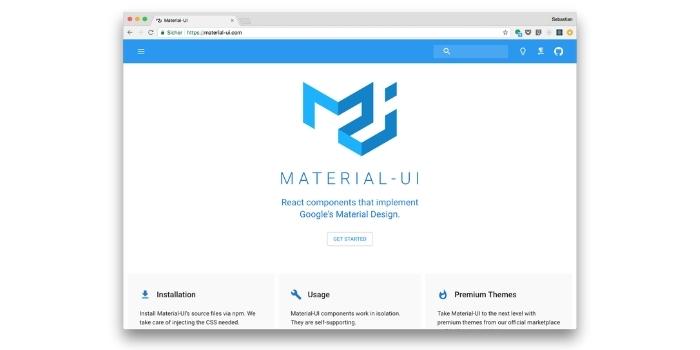
MUI-Datatables is a part of data tables and is based on Material-UI V1. It offers functionalities such as filtering, column view/hide, search, export to CSV download, printing, selectable rows, pagination, and sorting. In addition to the capacity to tailor styling on most views, two “stacked” and “scroll” responsive modes are available for mobile/tablet devices.
Read More:
How to get an e-learning mobile app development to connect teachers, parents and students?
Pros of Material-UI-datatables
- It offers customized components and styling
- It is very responsive to any device
- It eases up the tasks like filtering, view/hide columns, pagination, sorting
- It has concise and thorough documentation
Cons of Material-UI-datatables
- It does not support localization through external libraries
Key Features of Material-UI-data tables
- It has 3 responsive modes standard, vertical, and simple for mobile devices.
- It allows you to create responsive data tables.
RC-Table
Another helpful React Table library is Rc-Table. On GitHub, it has more than 500 stars. It consists of a lot of unique features and is lightweight, even if it does not look that stylish. So if you wish to access your styling on top of the current behavior, it would work for you.
Pros of RC-Table
- It is pretty light-weight and simple
- It helps in filtering data through dropdown menus on the column headings
- It offers a lot of examples with source code
Cons of RC-Table
- It gives you access to limited documentation.
Key Features of RC-Table
- It has a built-in responsive design
- The library has several plugins
- It is brilliant in performance
React-virtualized
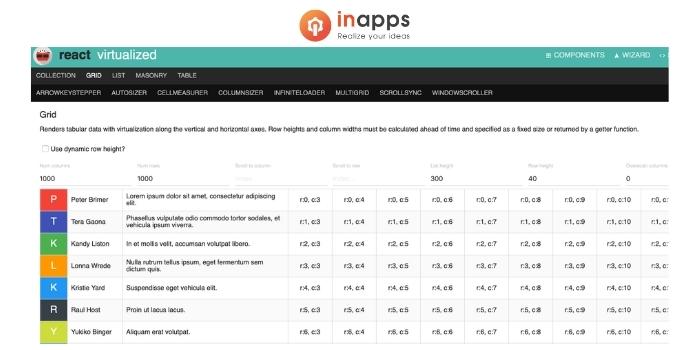
It is an open-source library that offers you several components to window a few of your application list, grid, etc. You do not have to start as a complete beginner as a developer. React-virtualized is a library that is robust and managed. The community is wide and, since it is open-source, there are already several modules and extensions available to window a maximum of elements. In addition, it includes lots of functionality and customization that you wouldn’t even know about.
Pros of React-virtualized
- Helps improve the performance of your React application
- Limits the number of calls to render
- Limits the number of DOM elements
Cons of React-virtualized
- May introduce a bit of constraint on your UI.
Key Features of React-virtualized
- It is great for windowing.
- You can virtualize a 2-D collection that is not a grid.
- It offers a pre-built solution.
React-data-grid
React Data Grid has a fully-featured control for viewing data in a tabular format. The broad range of features includes data binding, editing, Excel-like filtering, custom sorting, row aggregation, Excel, CSV, and PDF format collection, and support. For great performance, the data Grid has an integrated architecture. It loads high data volumes, almost 1 million+ records, within one second without any efficiency degradation with the aid of row and column virtualization.
Pros of React-data-grid
- Lightning-fast rendering
- Rich editing and formatting
- Configurable and customizable
- Packed full of Excel features
Cons of React-data-grid
- It can sometimes be buggy
- It has poor documentation
- It can be complicated to use
Key Features of React-data-grid
- It can load a humongous amount of records in just a second.
- It has a mobile-first design that works at any resolution.
- Unique Excel-like filtering and grouping options.
- Several column customizations and data summaries.
- Streamlined data exporting choices like PDF, CSV, and Excel.
React-super-responsive-table
This converts your table data to a user-friendly list in mobile view. The simplest method to use react-super-responsive-table is to install it from NPM and add it in your own React build process (using Browserify, Webpack, etc).
Read More:
Healthcare mobile app development | What is, Cost, Use cases,...
React-bootstrap-table
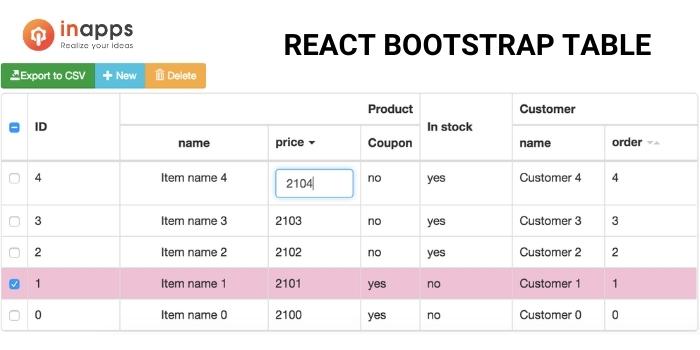
It is built with native [email protected] and not dependent on react-bootstrap, but fully compatible with it. React-bootstrap-table is a react table component using Bootstrap. It offers single or multi-select, column sorting, and dynamic resizing. A lot of functionalities like pagination, local or remote data sorting, etc. can easily be added externally.
Pros of React-bootstrap-table
- Functional table
- Manipulation
- Customization
Cons of React-bootstrap-table
- The documentation can sometimes be a bit unclear.
Key Features of React-bootstrap-table
- It offers cell editing, row insert, and remove functions on the table.
- Declarative and compostable components for development.
- It supports data manipulation inside the table store or on your flux implements both.
- React-bootstrap-table is compatible with Bootstrap 3 and 4.
React-datasheet
It is a straightforward react table component to create a spreadsheet. React–Datasheet allows you to replace the renderers both for the overall structure (rows, cells, the sheet itself) and even as editors and viewers for specific cells.
Pros of React-datasheet
It is simple to use.
Key Features of React-datasheet
- Select cells, cut, copy and paste cells
- Navigation using keyboard keys
- Deletion using keyboard keys
- Callbacks for onCellsChanged, value Renderer(visible data)
- dataRenderer(underlying data in the input, takes the value by default)
- Supply your own editors and view controls with custom renderers
- Extensive control over generated markup via custom renderers
To sum up
The libraries mentioned in our article will give developers a kick-start, like any other React Library, by enabling them to avoid the problems of designing the behavior and styling of tables that are widely used in React and all types of applications.
When choosing one or more of these libraries for your React application, what is important to note is to check how up-to-date the code is on GitHub, how many individuals have used/starred them, the extent of configuration that is feasible, and the volume of weight it introduces in terms of file sizes and the number of dependencies.
The requirements of every other project could be different, and we hope that you will be able to find an ideal React Table Library that suits your needs in the list.
React is a library developed and maintained by Facebook. Unlike angular or other MVC frameworks, React only works on the view part of the app.
React (also classified as React.js or ReactJS) is an open-source, front-end JavaScript library for building user interfaces or UI components. Facebook and a community of individual developers and businesses are maintaining it. React can be used as a base for developing single-page or mobile applications.
To use react-table, you need to install it using Node Package Manager(npm). Once you have react-table installed, you need to import react-table into your react table component. Import react-table in your src/App. Js file.
Best React Table Libraries: FAQ
How to center a button in Bootstrap?
You can simply use the built-in class .text-center on the wrapper element to center align buttons or other inline elements in Bootstrap. It will work in both Bootstrap 3 and 4 versions.
How to center content in Bootstrap?
element.
Note: This solution only works in the Bootstrap 3 or 4 versions.
How to use the react table?
React Table is one of React’s most popular table libraries. It now has over 13,000 stars on GitHub, receives frequent updates, and supports Hooks. The react-table library is exceptionally lightweight and provides all of the fundamental functionalities required for any simple table.
Looking to hire well-experienced professionals in React? Go to InApps right now to find yourself some of the most well-versed individuals in the industry.
4.5/5 - (126 votes)
Related Articles

Best Countries to Outsource Software Development (2026 Guide)
Software development outsourcing means hiring an external engineering team - usually based in another country- to design, build, or maintain software on your behalf, instead of hiring in-house. Most US, UK, and Australian companies do this to access skilled engineers faster and at a lower fully-loaded cost than domestic hiring allows.

How to Hire Remote Developers Without Losing Code Quality: A 2026 Playbook for CTOs
Every CTO who hires remote developers eventually asks the same question: how do I know this is going to work before I've sunk three months and a sprint's worth of technical debt into finding out? Most guides to hiring remote developers answer a different question: which platform to use. They skip the part that actually determines whether the code that comes back is any good. This playbook covers the vetting mechanics, engagement models, and real rate data behind hiring remote engineers who ship production-quality code from week one, not another list of freelance marketplaces.

IT Managed Services vs Break-Fix IT Support: What Growing Startups Need in 2026
Break-fix IT feels free right up until the week something breaks in production and there is no one already watching for it. Here is how growing startups actually decide between break-fix support and managed services in 2026, and why the decision has gotten sharper for anyone shipping a product built quickly with AI tools.