

InfluxDB and IoT: Arduino Microcontroller Best Practices is an article under the topic Data Science Many of you are most interested in today !! Today,
In this piece, you can learn more about how Arduino and InfluxDB work together for practical IoT applications. Arduino is open source and offers flexibility that works well with InfluxDB as part of a low-cost, straightforward architecture.
Read More:
Update The Role of Machine Learning in Data Management
What Is Arduino?

Brian Gilmore
Brian is director of IoT product management at InfluxData, the creators of InfluxDB.
Everything you would ever need to know about Arduino is very well documented on the official Arduino website: Arduino.cc
To summarize the information there, Arduino is an open source electronics platform. It is designed for ease of use and integration and includes tightly coupled software and hardware for myriad applications in IoT, industrial, and home laboratory environments. The key tenets of the Arduino architecture are its open source specification, cross-platform client support, simple programming language, low power requirements, and of course, its low cost per device. You can pick up an Arduino board for around $20 at any online electronics retailer.
The foundation of Arduino programming relies on relatively simple scripts, called “sketches.” These scripts are created in the Arduino Programming Language, which by most measures is a variant of C++. The Arduino IDE has good support for C, C++ and Arduino, but in many cases users may decide to program Arduino or their full IoT stack using a full-featured IDE like VS Code. Installing the Arduino and Flux extensions for VS Code opens the door to end-to-end development of Arduino, an IoT gateway, and time-series applications built on InfluxDB.
On top of the official Arduino hardware, there are dozens or more compatible boards from other microcontroller manufacturers. These boards are built around the open source Arduino hardware and software specification but may include additional out-of-specification features. Several popular boards from Expressif, including the ESP32 and ESP8266, fall in this category. For the purposes of this document, we will consider all Arduino-compliant boards the same.
Best Practices for Arduino and InfluxDB Integration
There is a well-known Arduino library for integrating the ESP8266 with InfluxDB. InfluxDB is a contributor/maintainer of this library, and you can find references to it in Product wherever we present our SDK libraries, even, for example in our new notebooks interface.
This library presents a very good, straightforward method to send data from an Arduino to a local instance of InfluxDB. It also adds the capability to query data from that same local instance or InfluxDB. While the SDK supports direct writes to InfluxDB Cloud, there are better options to do this in production environments.
It is no issue to update a single Arduino when certificates expire, although the library currently ships with an ISRG Root X1 certificate good until 2035, but imagine managing a fleet of 50 or 100 Arduino-based IoT devices. Regular reflashing to replace direct-dialing instructions is not the best route. Skipping certificate validation is an option, but obviously not recommended for anything other than point-to-point home laboratory and prototyping.
Instead, it is common in IoT architectures to use a “gateway,” an intermediary device or application that acts as a proxy between the edge devices and external and cloud applications or services. A simple representation of this architecture:
Read More:
Git-Centric Control for Multiclouds – InApps 2022
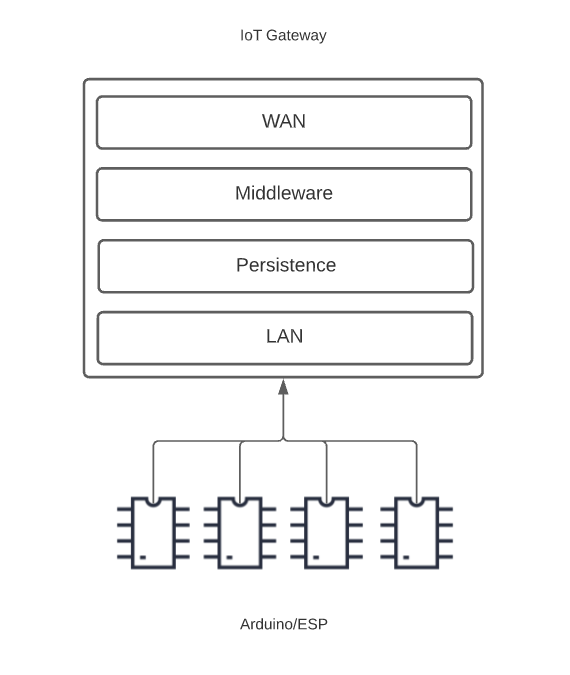
Centralizing the connections and communication for many edge controllers adds the following conveniences:
- Local-area connections for microcontrollers: For most applications, segmenting the network so that microcontrollers, actuators and sensors are on a demarcated segment of the network, and not the public internet, provides a significant benefit for manageability and security.
- Fewer point-to-point connections: In the above diagram, the edge layer is represented by four Arduinos. In many cases, this could be dozens or hundreds of devices. Remote monitoring of this many devices can be a challenge when it requires point-to-point connections over IP. Whether managing static IP addresses or through proxy services like ngrok, secure connectivity from IDE, Arduino to Arduino and Arduino to cloud would be extremely difficult at scale. Using a gateway provides a single point of access that can be both monitored and secured.
- Better data management: Enabling a persistence layer and processing layer (middleware) in the gateway will provide several benefits. First, data sharing between Arduinos can be accomplished with a broker on the gateway. This is a common architecture that also significantly reduces point-to-point communications and enables guaranteed messaging and local data storage on the gateway — key when network communication is less than 100% available and reliable.
The good news is that you can use low-cost hardware like Raspberry Pi (~$35). There are also excellent “industrial-grade” IoT gateways from Advantech, Dell and others. Your main selection criteria are connection ports, processor selection and operating system. If you’re already programming in Arduino, you’re likely able to use the Linux-based Raspberry Pi, especially if you are prototyping or developing for home use.
Here are two basic architectures using this model for InfluxDB data collection — one using telegraf, the other adding local persistence with an edge-deployed InfluxDB:
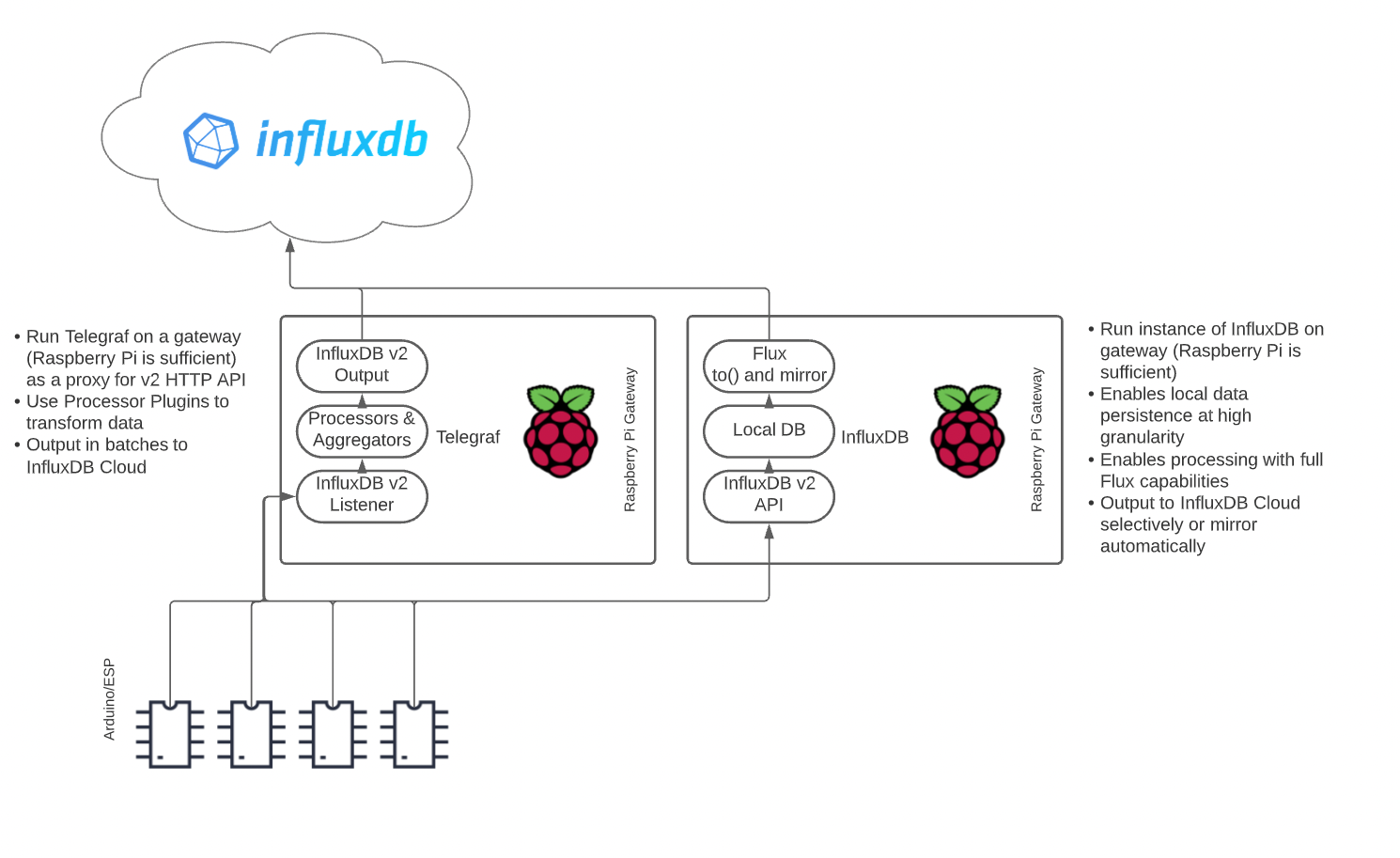
Both of these models allow you to send data to the InfluxDB endpoints using REST or the Arduino SDK. Or, if you use serial connection over USB or pins, you can run a Python script on the Raspberry Pi to regularly collect data from the Arduinos, format it in line protocol and push it to the Influx endpoints on localhost. Our team has written a great blog post that uses this architecture. You can read more about it here.
Sponsor Note

InfluxData, creator of the open source time-series platform InfluxDB, empowers developers to build transformative monitoring, analytics and IoT applications quicker and to scale. The platform handles the massive volume of time-stamped data produced by IoT devices, apps, networks and containers.
Extra Credit: Adding a MQTT broker to your gateway:
As mentioned above, adding a broker to your gateway provides a potentially critical layer to stage data in a manner that allows multiple consumers and producers to communicate in a pub/sub manner. MQTT brokers use topics, sometimes called channels, that act as endpoints for specific pieces of information created and transmitted by clients.
Read More:
The Challenge of Continuous Delivery in Distributed Environments – InApps 2022
Topics are hierarchical, so you can define schema within them to make machine-to-machine communications simple and self-documenting. For example, here are a list of topics you may use in a home lab:
#/HomeLab/Arduino1/temp
#/HomeLab/Arduino1/hum
#/HomeLab/Arduino1/press
#/HomeLab/Arduino2/temp
#/HomeLab/Arduino3/temp
As you can tell, accessing information is as easy as understanding the topic structure. Clients can publish to their own topic tree or subscribe to a peer’s tree to exchange information as it is published. InfluxDB has developed a telegraf plugin to easily subscribe to and parse MQTT topics, so adding a MQTT broker to the left-side architecture above will add significant benefits in reliability, security and long-term supportability. In this situation, your Arduinos are ignorant of the upstream InfluxDB. There are many how-tos on publishing to MQTT topics from an Arduino.
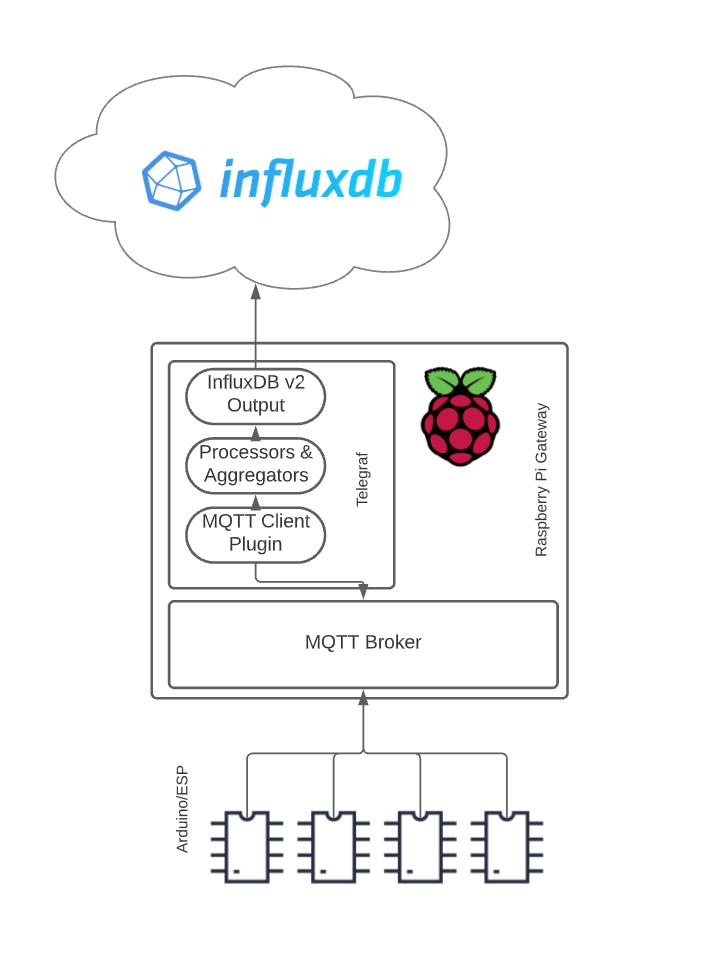
You can add a local InfluxDB to this architecture as well, although it would currently require loading both Telegraf and InfluxDB on the gateway, likely not an issue at all.
To summarize, there are several possible architectures for delivering data from sensors attached to an Arduino to InfluxDB. Using best practices and a robust IoT architecture, we can always be sure that our pilot or prototype is always ready to scale to production.
List of Keywords users find our article on Google:
influxdb
arduino
best microcontroller for iot
arduino cc
iot update device
hire arduino developers
iot remote jobs
arduino library
execute batch job iot device
influxdb client
arduino industrial
arduino cases
wikipedia mcu
arduino.cc
telegraf plugins
hire iot product managers
arduino c++
iot update management
“influxdata”
door to the other side wikipedia
replacedirect
arduino wikipedia
influxdb flux
arduino jobs
influxdb reviews
iot gateway advantech
hire arduino programmers
influxdb query
arduino file read
esp32 post request
influxdb data types
ngrok icon
esp32 mqtt broker
best site to learn arduino programming
open source development model diagram
arduino industry
arduino iot
iot run batch job
connect influxdb with
best vscode extensions for data science
iot updates
“influxdb”
isrg root x1 certificate
mcu wikipedia
influxdb update
mikrokontroller.net
influxdb c++
arduino iot gateway
arduino send whatsapp message
wikipedia iot
arduino all
hire remote arduino developers
gateway wikipedia
arduino.org
iot wikipedia
define arduino
hire remote arduino developer
influxdb top 10
python influxdb client example
arduino define
telegraf kubernetes input
hire arduino
tesla c++ jobs
arduino software wikipedia
arduino case
flux influxdb
influxdb select multiple fields
telegraf inputs.net
arduino cc projects
arduino post
best microcontroller 2020
for arduino
arduino struct
arduino whatsapp
processing arduino library
advantech vietnam
arduino find
arduino minimal
if arduino
arduino homepage
arduino wiki
cheap mqtt broker
e flux architecture
esp32 static ip
influx query
learn esp32 with arduino ide
projects for arduino
ардуино цц
iot sdk
arduino end if
arduino custom library
ardunio
esp32 project ideas
arduino serial communication between arduinos
arduino machine learning
arduino keywords
Related Articles

Best Countries to Outsource Software Development (2026 Guide)
Software development outsourcing means hiring an external engineering team - usually based in another country- to design, build, or maintain software on your behalf, instead of hiring in-house. Most US, UK, and Australian companies do this to access skilled engineers faster and at a lower fully-loaded cost than domestic hiring allows.

How to Hire Remote Developers Without Losing Code Quality: A 2026 Playbook for CTOs
Every CTO who hires remote developers eventually asks the same question: how do I know this is going to work before I've sunk three months and a sprint's worth of technical debt into finding out? Most guides to hiring remote developers answer a different question: which platform to use. They skip the part that actually determines whether the code that comes back is any good. This playbook covers the vetting mechanics, engagement models, and real rate data behind hiring remote engineers who ship production-quality code from week one, not another list of freelance marketplaces.
IT Managed Services vs Break-Fix IT Support: What Growing Startups Need in 2026
Break-fix IT feels free right up until the week something breaks in production and there is no one already watching for it. Here is how growing startups actually decide between break-fix support and managed services in 2026, and why the decision has gotten sharper for anyone shipping a product built quickly with AI tools.