

Hungry for more advanced and tricky JavaScript Interview questions and answers to transform yourself from a Junior JavaScript Developer into a Senior
Hungry for more advanced and tricky JavaScript Interview questions and answers to transform yourself from a Junior JavaScript Developer into a Senior JavaScript Guru before your next tech interview? Search no more! Come along and explore top hardest JavaScript Interview Questions and Answers including ES6, ES2015 for experienced web developer and get your next six-figure job offer.
Key Summary
- Core Concepts:
- Equality (Q1): Strict (===) avoids coercion; abstract (==) allows it. Use === for true, false, 0, “”, []. Coercion (Q2): Falsy values: “”, 0, -0, NaN, null, undefined, false. Others are truthy (e.g., “hello”, 42, arrays, objects). Hoisting (Q11): Declarations move to top of scope; initializations don’t. Closures (Q25): Functions retain access to variables in their scope after execution, enabling private variables. Temporal Dead Zone (Q15): let/const hoisted but inaccessible until declared.
- Equality (Q1): Strict (===) avoids coercion; abstract (==) allows it. Use === for true, false, 0, “”, []. Coercion (Q2): Falsy values: “”, 0, -0, NaN, null, undefined, false. Others are truthy (e.g., “hello”, 42, arrays, objects). Hoisting (Q11): Declarations move to top of scope; initializations don’t. Closures (Q25): Functions retain access to variables in their scope after execution, enabling private variables. Temporal Dead Zone (Q15): let/const hoisted but inaccessible until declared.
- Equality (Q1): Strict (===) avoids coercion; abstract (==) allows it. Use === for true, false, 0, “”, [].
- Coercion (Q2): Falsy values: “”, 0, -0, NaN, null, undefined, false. Others are truthy (e.g., “hello”, 42, arrays, objects).
- Hoisting (Q11): Declarations move to top of scope; initializations don’t.
- Closures (Q25): Functions retain access to variables in their scope after execution, enabling private variables.
- Temporal Dead Zone (Q15): let/const hoisted but inaccessible until declared.
- Functions & Scoping:
- IIFEs (Q3): Immediately invoked functions avoid global namespace pollution. Arrow Functions (Q4): Use for scope safety, compactness; function for global scope, class for constructors. Bind (Q6): Sets this context for functions, useful in React. Anonymous Functions (Q7): Used in IIFEs, one-off callbacks, or functional programming. Generators (Q9, Q10): Functions yielding values one at a time, saving context; ideal for controlled async operations.
- IIFEs (Q3): Immediately invoked functions avoid global namespace pollution. Arrow Functions (Q4): Use for scope safety, compactness; function for global scope, class for constructors. Bind (Q6): Sets this context for functions, useful in React. Anonymous Functions (Q7): Used in IIFEs, one-off callbacks, or functional programming. Generators (Q9, Q10): Functions yielding values one at a time, saving context; ideal for controlled async operations.
- IIFEs (Q3): Immediately invoked functions avoid global namespace pollution.
- Arrow Functions (Q4): Use for scope safety, compactness; function for global scope, class for constructors.
- Bind (Q6): Sets this context for functions, useful in React.
- Anonymous Functions (Q7): Used in IIFEs, one-off callbacks, or functional programming.
- Generators (Q9, Q10): Functions yielding values one at a time, saving context; ideal for controlled async operations.
- Objects & Prototypes:
- ES6 Class vs. ES5 Constructor (Q5): ES6 class simplifies inheritance (extends, super) compared to ES5’s verbose Object.create. Object.freeze vs. const (Q8): const locks bindings; Object.freeze makes objects immutable (needs deep freeze for nested objects). Prototype Pattern (Q14): Initializes objects by copying a prototype’s values, common in JavaScript’s prototypal inheritance. Revealing Module Pattern (Q18): Encapsulates private variables, exposing only selected methods via an object literal. Map vs. WeakMap (Q19): WeakMap allows garbage collection of keys; Map retains them.
- ES6 Class vs. ES5 Constructor (Q5): ES6 class simplifies inheritance (extends, super) compared to ES5’s verbose Object.create. Object.freeze vs. const (Q8): const locks bindings; Object.freeze makes objects immutable (needs deep freeze for nested objects). Prototype Pattern (Q14): Initializes objects by copying a prototype’s values, common in JavaScript’s prototypal inheritance. Revealing Module Pattern (Q18): Encapsulates private variables, exposing only selected methods via an object literal. Map vs. WeakMap (Q19): WeakMap allows garbage collection of keys; Map retains them.
- ES6 Class vs. ES5 Constructor (Q5): ES6 class simplifies inheritance (extends, super) compared to ES5’s verbose Object.create.
- Object.freeze vs. const (Q8): const locks bindings; Object.freeze makes objects immutable (needs deep freeze for nested objects).
- Prototype Pattern (Q14): Initializes objects by copying a prototype’s values, common in JavaScript’s prototypal inheritance.
- Revealing Module Pattern (Q18): Encapsulates private variables, exposing only selected methods via an object literal.
- Map vs. WeakMap (Q19): WeakMap allows garbage collection of keys; Map retains them.
- Arrays & Data Manipulation:
- forEach vs. map (Q16): forEach iterates without return; map creates a new array. Use map for results, forEach for side effects. Emptying Arrays (Q24): Methods include reassign (=[]), set length=0, splice, or pop/shift loops. Remove Duplicates (Q28): Use Set, filter, or manual array checks to eliminate duplicates. Palindrome Check (Q34): Compare string with its reversed form after cleaning (lowercase, remove non-letters).
- forEach vs. map (Q16): forEach iterates without return; map creates a new array. Use map for results, forEach for side effects. Emptying Arrays (Q24): Methods include reassign (=[]), set length=0, splice, or pop/shift loops. Remove Duplicates (Q28): Use Set, filter, or manual array checks to eliminate duplicates. Palindrome Check (Q34): Compare string with its reversed form after cleaning (lowercase, remove non-letters).
- forEach vs. map (Q16): forEach iterates without return; map creates a new array. Use map for results, forEach for side effects.
- Emptying Arrays (Q24): Methods include reassign (=[]), set length=0, splice, or pop/shift loops.
- Remove Duplicates (Q28): Use Set, filter, or manual array checks to eliminate duplicates.
- Palindrome Check (Q34): Compare string with its reversed form after cleaning (lowercase, remove non-letters).
- DOM & Browser:
- Event Delegation (Q36): Attach listeners to a parent to handle child events efficiently. Document Loading (Q27): Scripts in ensure instant loading; browsers parse properties and values. Remove Content (Q31): Hide with display: none or remove via removeChild. Cookies (Q49): Store small data (e.g., usernames, cart info) for websites. Deferred Scripts (Q50): Delay script execution until HTML parsing completes, reducing load time.
- Event Delegation (Q36): Attach listeners to a parent to handle child events efficiently. Document Loading (Q27): Scripts in ensure instant loading; browsers parse properties and values. Remove Content (Q31): Hide with display: none or remove via removeChild. Cookies (Q49): Store small data (e.g., usernames, cart info) for websites. Deferred Scripts (Q50): Delay script execution until HTML parsing completes, reducing load time.
- Event Delegation (Q36): Attach listeners to a parent to handle child events efficiently.
- Document Loading (Q27): Scripts in ensure instant loading; browsers parse properties and values.
- Remove Content (Q31): Hide with display: none or remove via removeChild.
- Cookies (Q49): Store small data (e.g., usernames, cart info) for websites.
- Deferred Scripts (Q50): Delay script execution until HTML parsing completes, reducing load time.
- ES6+ & Modern Features:
- Async/Await vs. Generators (Q23): Async/await simplifies sequential async code; generators yield values manually. Imports/Exports (Q37): Enable modular code; import * as obj imports all exports as an object. Typecasting (Q40): Convert types with Boolean(), Number(), String(). Multi-line Strings (Q29): Use template literals, concatenation, or escaped newlines.
- Async/Await vs. Generators (Q23): Async/await simplifies sequential async code; generators yield values manually. Imports/Exports (Q37): Enable modular code; import * as obj imports all exports as an object. Typecasting (Q40): Convert types with Boolean(), Number(), String(). Multi-line Strings (Q29): Use template literals, concatenation, or escaped newlines.
- Async/Await vs. Generators (Q23): Async/await simplifies sequential async code; generators yield values manually.
- Imports/Exports (Q37): Enable modular code; import * as obj imports all exports as an object.
- Typecasting (Q40): Convert types with Boolean(), Number(), String().
- Multi-line Strings (Q29): Use template literals, concatenation, or escaped newlines.
- Miscellaneous:
- this Operator (Q22): Context varies by invocation (global, object, call/apply, new, bind). Pass-by-Value (Q20): JavaScript passes by value; object references mimic pass-by-reference. BOM (Q39): Browser Object Model enables interaction with browser features (window, history, etc.). Strict Mode (Q38): Enforces stricter rules, preventing undeclared variables. Primitive Types (Q42): boolean, null, undefined, number, string. Dynamic Properties (Q44): Add with obj.prop = value, delete with delete obj.prop. URL Encoding (Q45): encodeURI for URLs, encodeURIComponent for special characters; decodeURI reverses. Page Title (Q46): Change via document.title = “New Title”. Escape Characters (Q48): Use backslash (\) for special characters (e.g., quotes).
- this Operator (Q22): Context varies by invocation (global, object, call/apply, new, bind). Pass-by-Value (Q20): JavaScript passes by value; object references mimic pass-by-reference. BOM (Q39): Browser Object Model enables interaction with browser features (window, history, etc.). Strict Mode (Q38): Enforces stricter rules, preventing undeclared variables. Primitive Types (Q42): boolean, null, undefined, number, string. Dynamic Properties (Q44): Add with obj.prop = value, delete with delete obj.prop. URL Encoding (Q45): encodeURI for URLs, encodeURIComponent for special characters; decodeURI reverses. Page Title (Q46): Change via document.title = “New Title”. Escape Characters (Q48): Use backslash (\) for special characters (e.g., quotes).
- this Operator (Q22): Context varies by invocation (global, object, call/apply, new, bind).
- Pass-by-Value (Q20): JavaScript passes by value; object references mimic pass-by-reference.
- BOM (Q39): Browser Object Model enables interaction with browser features (window, history, etc.).
- Strict Mode (Q38): Enforces stricter rules, preventing undeclared variables.
- Primitive Types (Q42): boolean, null, undefined, number, string.
- Dynamic Properties (Q44): Add with obj.prop = value, delete with delete obj.prop.
- URL Encoding (Q45): encodeURI for URLs, encodeURIComponent for special characters; decodeURI reverses.
- Page Title (Q46): Change via document.title = “New Title”.
- Escape Characters (Q48): Use backslash (\) for special characters (e.g., quotes).
- Code Examples:
- Array Print (Q26): Loop to format array as string: [“DataFlair”, 2019, 1.0, true]. Associative Array Length (Q32): Count keys with for…in loop (e.g., output: 4). typeof Output (Q33): typeof typeof 1 returns “string” (typeof 1 is “number”). Delete Operator (Q12, Q13, Q30): Doesn’t affect local variables or prototype properties; array length unchanged.
- Array Print (Q26): Loop to format array as string: [“DataFlair”, 2019, 1.0, true]. Associative Array Length (Q32): Count keys with for…in loop (e.g., output: 4). typeof Output (Q33): typeof typeof 1 returns “string” (typeof 1 is “number”). Delete Operator (Q12, Q13, Q30): Doesn’t affect local variables or prototype properties; array length unchanged.
- Array Print (Q26): Loop to format array as string: [“DataFlair”, 2019, 1.0, true].
- Associative Array Length (Q32): Count keys with for…in loop (e.g., output: 4).
- typeof Output (Q33): typeof typeof 1 returns “string” (typeof 1 is “number”).
- Delete Operator (Q12, Q13, Q30): Doesn’t affect local variables or prototype properties; array length unchanged.
Q1: Explain equality in JavaScript
Topic: JavaScript Difficulty: ⭐
JavaScript has both strict and type–converting comparisons:
- Strict comparison (e.g., ===) checks for value equality without allowing coercion
- Abstract comparison (e.g. ==) checks for value equality with coercion allowed
var a = "42";
var b = 42;

a == b;            // true
a === b;        // false
Some simple equalityrules:
- If either value (aka side) in a comparison could be the true or false value, avoid == and use ===.
- If either value in a comparison could be of these specific values (0, "", or [] — empty array), avoid == and use ===.
- In all other cases, you’re safe to use ==. Not only is it safe, but in many cases it simplifies your code in a way that improves readability.
? Source: FullStack.Cafe
Q2: Provide some examples of non-bulean value coercion to a boolean one
Topic: JavaScript Difficulty: ⭐⭐⭐
The question is when a non-boolean value is coerced to a boolean, does it become true or false, respectively?
"" (empty string)
0, -0, NaN (invalid number)
null, undefined
false
The specific list of “falsy” values in JavaScript is as follows:
Any value that’s not on this “falsy” list is “truthy.” Here are some examples of those:
"hello"
42
true
[ ], [ 1, "2", 3 ] (arrays)
{ }, { a: 42 } (objects)
function foo() { .. } (functions)
? Source: FullStack.Cafe
Q3: What is IIFEs (Immediately Invoked Function Expressions)?
Topic: JavaScript Difficulty: ⭐⭐⭐
It’s an Immediately-Invoked Function Expression, or IIFE for short. It executes immediately after it’s created:
(function IIFE(){
    console.log( "Hello!" );
})();
// "Hello!"
This pattern is often used when trying to avoid polluting the global namespace, because all the variables used inside the IIFE (like in any other normal function) are not visible outside its scope.
? Source: stackoverflow.com
Q4: When should I use Arrow functions in ES6?
Topic: JavaScript Difficulty: ⭐⭐⭐
I’m now using the following rule of thumb for functions in ES6 and beyond:
- Use function in the global scope and for Object.prototype properties.
- Use class for object constructors.
- Use => everywhere else.
Why use arrow functions almost everywhere?
- Scope safety: When arrow functions are used consistently, everything is guaranteed to use the same thisObject as the root. If even a single standard function callback is mixed in with a bunch of arrow functions there’s a chance the scope will become messed up.
- Compactness: Arrow functions are easier to read and write. (This may seem opinionated so I will give a few examples further on).
- Clarity: When almost everything is an arrow function, any regular function immediately sticks out for defining the scope. A developer can always look up the next-higher function statement to see what the thisObject is.
Read More:
The Path Forward for Apps – InApps Technology 2022
? Source: stackoverflow.com
Q5: What are the differences between ES6 class and ES5 function constructors?
Topic: JavaScript Difficulty: ⭐⭐⭐
Let’s first look at example of each:
// ES5 Function Constructor
function Person(name) {
  this.name = name;
}

// ES6 Class
class Person {
  constructor(name) {
    this.name = name;
  }
}
For simple constructors, they look pretty similar.
The main difference in the constructor comes when using inheritance. If we want to create a Student class that subclasses Person and add a studentId field, this is what we have to do in addition to the above.
// ES5 Function Constructor
function Student(name, studentId) {
  // Call constructor of superclass to initialize superclass-derived members.
  Person.call(this, name);

  // Initialize subclass's own members.
  this.studentId = studentId;
}

Student.prototype = Object.create(Person.prototype);
Student.prototype.constructor = Student;

// ES6 Class
class Student extends Person {
  constructor(name, studentId) {
    super(name);
    this.studentId = studentId;
  }
}
It’s much more verbose to use inheritance in ES5 and the ES6 version is easier to understand and remember.
? Source: github.com/yangshun
Q6: Explain Function.prototype.bind.
Topic: JavaScript Difficulty: ⭐⭐⭐
Taken word-for-word from MDN:
The bind() method creates a new function that, when called, has its this keyword set to the provided value, with a given sequence of arguments preceding any provided when the new function is called.
In my experience, it is most useful for binding the value of this in methods of classes that you want to pass into other functions. This is frequently done in React components.
? Source: github.com/yangshun
Q7: What’s a typical use case for anonymous functions?
Topic: JavaScript Difficulty: ⭐⭐⭐
They can be used in IIFEs to encapsulate some code within a local scope so that variables declared in it do not leak to the global scope.
(function() {
  // Some code here.
})();
As a callback that is used once and does not need to be used anywhere else. The code will seem more self-contained and readable when handlers are defined right inside the code calling them, rather than having to search elsewhere to find the function body.
setTimeout(function() {
  console.log('Hello world!');
}, 1000);
Arguments to functional programming constructs or Lodash (similar to callbacks).
const arr = [1, 2, 3];
const double = arr.map(function(el) {
  return el * 2;
});
console.log(double); // [2, 4, 6]
? Source: github.com/yangshun
Q8: Explain the difference between Object.freeze() vs const
Topic: JavaScript Difficulty: ⭐⭐⭐
const and Object.freeze are two completely different things.
- const applies to bindings (“variables”). It creates an immutable binding, i.e. you cannot assign a new value to the binding.
const person = {
    name: "Leonardo"
};
let animal = {
    species: "snake"
};
person = animal; // ERROR "person" is read-only
- Object.freeze works on values, and more specifically, object values. It makes an object immutable, i.e. you cannot change its properties.
let person = {
    name: "Leonardo"
};
let animal = {
    species: "snake"
};
Object.freeze(person);
person.name = "Lima"; //TypeError: Cannot assign to read only property 'name' of object
console.log(person);
? Source: stackoverflow.com
Q9: What is generator in JS?
Topic: JavaScript Difficulty: ⭐⭐⭐
Generators are functions which can be exited and later re-entered. Their context (variable bindings) will be saved across re-entrances. Generator functions are written using the function* syntax. When called initially, generator functions do not execute any of their code, instead returning a type of iterator called a Generator. When a value is consumed by calling the generator’s next method, the Generator function executes until it encounters the yield keyword.
The function can be called as many times as desired and returns a new Generator each time, however each Generator may only be iterated once.
function* makeRangeIterator(start = 0, end = Infinity, step = 1) {
    let iterationCount = 0;
    for (let i = start; i < end; i += step) {
        iterationCount++;
        yield i;
    }
    return iterationCount;
}
? Source: stackoverflow.com
Q10: When should we use generators in ES6?
Topic: JavaScript Difficulty: ⭐⭐⭐
To put it simple, generator has two features:
- one can choose to jump out of a function and let outer code to determine when to jump back into the function.
- the control of asynchronous call can be done outside of your code
The most important feature in generators — we can get the next value in only when we really need it, not all the values at once. And in some situations it can be very convenient.
? Source: stackoverflow.com
Q11: Explain what is hoisting in Javascript
Topic: JavaScript Difficulty: ⭐⭐⭐⭐
Hoisting is the concept in which Javascript, by default, moves all declarations to the top of the current scope. As such, a variable can be used before it has been declared.
Note that Javascript only hoists declarations and not initializations.
? Source: https://github.com/kennymkchan
Q12: What will be the output of the following code?
Topic: JavaScript Difficulty: ⭐⭐⭐⭐
var output = (function(x) {
  delete x;
  return x;
})(0);

console.log(output);
Above code will output 0 as output. delete operator is used to delete a property from an object. Here x is not an object it’s local variable. delete operator doesn’t affect local variable.
? Source: github.com/ganqqwerty
Q13: What will be the output of the following code?
Topic: JavaScript Difficulty: ⭐⭐⭐⭐
var Employee = {
  company: 'xyz'
}
var emp1 = Object.create(Employee);
delete emp1.company
console.log(emp1.company);
Above code will output xyz as output. Here emp1 object got company as prototype property. delete operator doesn’t delete prototype property.
emp1 object doesn’t have company as its own property. You can test it like:
console.log(emp1.hasOwnProperty('company')); //output : false
However, we can delete company property directly from Employee object using delete Employee.company or we can also delete from emp1 object using __proto__ property delete emp1.__proto__.company.
? Source: github.com/ganqqwerty
Q14: Explain the Prototype Design Pattern
Topic: JavaScript Difficulty: ⭐⭐⭐⭐
The Prototype Pattern creates new objects, but rather than creating non-initialized objects it returns objects that are initialized with values it copied from a prototype – or sample – object. The Prototype pattern is also referred to as the Properties pattern.
An example of where the Prototype pattern is useful is the initialization of business objects with values that match the default values in the database. The prototype object holds the default values that are copied over into a newly created business object.
Classical languages rarely use the Prototype pattern, but JavaScript being a prototypal language uses this pattern in the construction of new objects and their prototypes.
Q15: What is the Temporal Dead Zone in ES6?
Topic: JavaScript Difficulty: ⭐⭐⭐⭐
In ES6 let and const are hoisted (like var, class and function), but there is a period between entering scope and being declared where they cannot be accessed. This period is the temporal dead zone (TDZ).
Consider:
//console.log(aLet)  // would throw ReferenceError

let aLet;
console.log(aLet); // undefined
aLet = 10;
console.log(aLet); // 10
In this example the TDZ ends when aLet is declared, rather than assigned.
? Source: github.com/ajzawawi
Q16: Can you describe the main difference between a .forEach loop and a .map() loop and why you would pick one versus the other?
Topic: JavaScript Difficulty: ⭐⭐⭐⭐
To understand the differences between the two, let’s look at what each function does.
forEach
- Iterates through the elements in an array.
- Executes a callback for each element.
- Does not return a value.
const a = [1, 2, 3];
const doubled = a.forEach((num, index) => {
  // Do something with num and/or index.
});

// doubled = undefined
map
- Iterates through the elements in an array.
- “Maps” each element to a new element by calling the function on each element, creating a new array as a result.
const a = [1, 2, 3];
const doubled = a.map(num => {
  return num * 2;
});

// doubled = [2, 4, 6]
The main difference between .forEach and .map() is that .map() returns a new array. If you need the result, but do not wish to mutate the original array, .map() is the clear choice. If you simply need to iterate over an array, forEach is a fine choice.
? Source: github.com/yangshun
Q17: What’s the difference between a variable that is: null, undefined or undeclared? How would you go about checking for any of these states?
Topic: JavaScript Difficulty: ⭐⭐⭐⭐
Undeclared variables are created when you assign a value to an identifier that is not previously created using var, let or const. Undeclared variables will be defined globally, outside of the current scope. In strict mode, a ReferenceError will be thrown when you try to assign to an undeclared variable. Undeclared variables are bad just like how global variables are bad. Avoid them at all cost! To check for them, wrap its usage in a try/catch block.
function foo() {
  x = 1; // Throws a ReferenceError in strict mode
}

foo();
console.log(x); // 1
A variable that is undefined is a variable that has been declared, but not assigned a value. It is of type undefined. If a function does not return any value as the result of executing it is assigned to a variable, the variable also has the value of undefined. To check for it, compare using the strict equality (===) operator or typeof which will give the 'undefined' string. Note that you should not be using the abstract equality operator to check, as it will also return true if the value is null.
var foo;
console.log(foo); // undefined
console.log(foo === undefined); // true
console.log(typeof foo === 'undefined'); // true

console.log(foo == null); // true. Wrong, don't use this to check!

function bar() {}
var baz = bar();
console.log(baz); // undefined
A variable that is null will have been explicitly assigned to the null value. It represents no value and is different from undefined in the sense that it has been explicitly assigned. To check for null, simply compare using the strict equality operator. Note that like the above, you should not be using the abstract equality operator (==) to check, as it will also return true if the value is undefined.
var foo = null;
console.log(foo === null); // true
console.log(typeof foo === 'object'); // true

console.log(foo == undefined); // true. Wrong, don't use this to check!
As a personal habit, I never leave my variables undeclared or unassigned. I will explicitly assign null to them after declaring if I don’t intend to use it yet. If you use a linter in your workflow, it will usually also be able to check that you are not referencing undeclared variables.
Read More:
Top Sketch Plug-ins to Improve your Workflow
? Source: github.com/yangshun
Q18: Describe the Revealing Module Pattern design pattern
Topic: JavaScript Difficulty: ⭐⭐⭐⭐⭐
A variation of the module pattern is called the Revealing Module Pattern. The purpose is to maintain encapsulation and reveal certain variables and methods returned in an object literal. The direct implementation looks like this:
var Exposer = (function() {
  var privateVariable = 10;

  var privateMethod = function() {
    console.log('Inside a private method!');
    privateVariable++;
  }

  var methodToExpose = function() {
    console.log('This is a method I want to expose!');
  }

  var otherMethodIWantToExpose = function() {
    privateMethod();
  }

  return {
      first: methodToExpose,
      second: otherMethodIWantToExpose
  };
})();

Exposer.first();        // Output: This is a method I want to expose!
Exposer.second();       // Output: Inside a private method!
Exposer.methodToExpose; // undefined
An obvious disadvantage of it is unable to reference the private methods
? Source: scotch.io
Q19: What’s the difference between ES6 Map and WeakMap?
Topic: JavaScript Difficulty: ⭐⭐⭐⭐⭐
They both behave differently when a object referenced by their keys/values gets deleted. Lets take the below example code:
(function() {
    var a = {
        x: 12
    };
    var b = {
        y: 12
    };

    map.set(a, 1);
    weakmap.set(b, 2);
})()
The above IIFE is executed there is no way we can reference {x: 12} and {y: 12} anymore. Garbage collector goes ahead and deletes the key b pointer from “WeakMap” and also removes {y: 12} from memory. But in case of “Map”, the garbage collector doesn’t remove a pointer from “Map” and also doesn’t remove {x: 12} from memory.
WeakMap allows garbage collector to do its task but not Map. With manually written maps, the array of keys would keep references to key objects, preventing them from being garbage collected. In native WeakMaps, references to key objects are held “weakly“, which means that they do not prevent garbage collection in case there would be no other reference to the object.
? Source: stackoverflow.com
Q20: Is JavaScript a pass-by-reference or pass-by-value language?
Topic: JavaScript Difficulty: ⭐⭐⭐⭐⭐
It’s always pass by value, but for objects the value of the variable is a reference. Because of this, when you pass an object and change its members, those changes persist outside of the function. This makes it look like pass by reference. But if you actually change the value of the object variable you will see that the change does not persist, proving it’s really pass by value.
Example:
function changeStuff(a, b, c)
{
  a = a * 10;
  b.item = "changed";
  c = {item: "changed"};
}

var num = 10;
var obj1 = {item: "unchanged"};
var obj2 = {item: "unchanged"};

changeStuff(num, obj1, obj2);

console.log(num);
console.log(obj1.item);
console.log(obj2.item);
Output:
10
changed
unchanged
? Source: stackoverflow.com
Q21: How to “deep-freeze” object in JavaScript?
Topic: JavaScript Difficulty: ⭐⭐⭐⭐⭐
If you want make sure the object is deep frozen you have to create a recursive function to freeze each property which is of type object:
Without deep freeze:
let person = {
    name: "Leonardo",
    profession: {
        name: "developer"
    }
};
Object.freeze(person); // make object immutable
person.profession.name = "doctor";
console.log(person); //output { name: 'Leonardo', profession: { name: 'doctor' } }
With deep freeze:
function deepFreeze(object) {
    let propNames = Object.getOwnPropertyNames(object);
    for (let name of propNames) {
        let value = object[name];
        object[name] = value && typeof value === "object" ?
            deepFreeze(value) : value;
    }
    return Object.freeze(object);
}
let person = {
    name: "Leonardo",
    profession: {
        name: "developer"
    }
};
deepFreeze(person);
person.profession.name = "doctor"; // TypeError: Cannot assign to read only property 'name' of object
? Source: medium.com
Q22: In JavaScript, why is the “this” operator inconsistent?
Topic: JavaScript Difficulty: ⭐⭐⭐⭐⭐
The most important thing to understand is that a function object does not have a fixed this value — the value of this changes depending on how the function is called. We say that a function is invoked with some a particular this value — the this value is determined at invocation time, not definition time.
- If the function is called as a “raw” function (e.g., just do someFunc()), this will be the global object (window in a browser) (or undefined if the function runs in strict mode).
- If it is called as a method on an object, this will be the calling object.
- If you call a function with call or apply, this is specified as the first argument to call or apply.
- If it is called as an event listener, this will be the element that is the target of the event.
- If it is called as a constructor with new, this will be a newly-created object whose prototype is set to the prototype property of the constructor function.
- If the function is the result of a bind operation, the function will always and forever have this set to the first argument of the bind call that produced it. (This is the single exception to the “functions don’t have a fixed this” rule — functions produced by bind actually do have an immutable this.)
? Source: stackoverflow.com
Q23: Compare Async/Await and Generators usage to achive same functionality
Topic: JavaScript Difficulty: ⭐⭐⭐⭐⭐
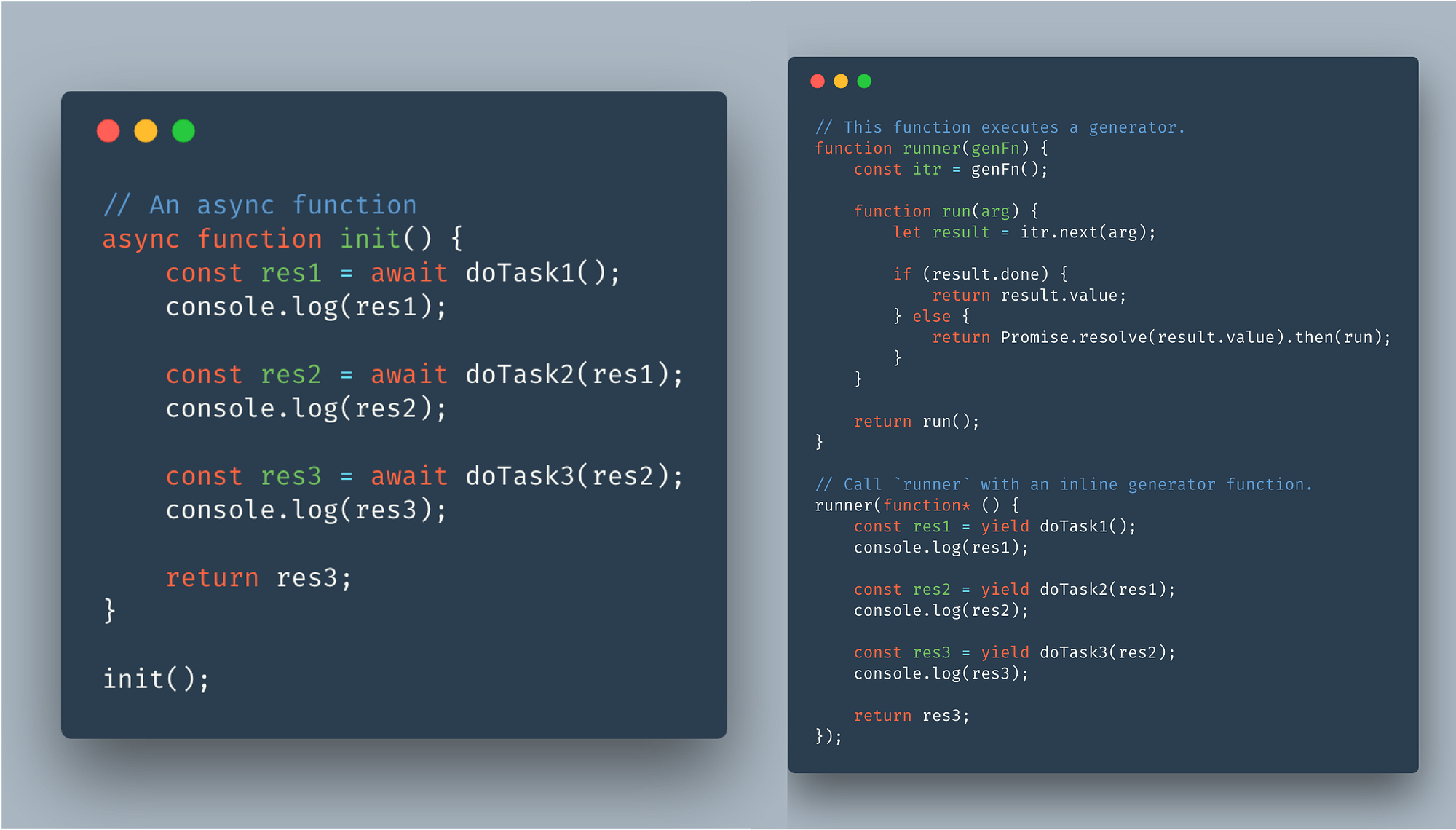
- Generator function are executed yield by yield i.e one yield-expression at a time by its iterator (the next method) where as Async-await, they are executed sequential await by await.
- Async/await makes it easier to implement a particular use case of Generators.
- The return value of Generator is always {value: X, done: Boolean} where as for Async function it will always be a promise that will either resolve to the value X or throw an error.
- Async function can be decomposed into Generator and promise implementation like:
? Source: stackoverflow.com
Q24. In what ways we can empty a JavaScript Array?
Topic: JavaScript Difficulty: ⭐⭐⭐⭐⭐
Below techniques can be used to get an empty array:
- You can modify the older array as an empty array.
emptyArray = [ ];
- You can fix the length according to you of a predefined array to zero.
definedArray.length = 0;
- You can update the array to contain zero elements with the help of the JavaScript splice() method.
definedArray.splice(0, definedArray.length);
- You can pluck out all the elements of the array with the help of array methods: pop() or shift().
while(definedArray.length){
        definedArray.pop();
} //pop() method
Or
while(definedArray.length){ definedArray.shift(); } //shift() method
Q25. What is the role of closures in JavaScript?
Topic: JavaScript Difficulty: ⭐⭐⭐⭐⭐
The script builds a closure in JavaScript at the time of making of a function. It is a local variable that is present in the memory even after the function finishes its execution. Besides, it has a great access to the variable in three scopes: variable in its scope, global variables, and variables in the enclosing function’s scope. However, closures are tough in JavaScript to make sure the variable privacy, that is, to build private variables. Since JavaScript has no modifiers for access, closures permit the programmer to make variables that are not directly accessible.
Q26. Write the JavaScript code to print the following output on your console window.
Array: [“DataFlair”, 2019, 1.0, true]
Topic: JavaScript Difficulty: ⭐⭐⭐⭐
The code to print the below output in the console window is:
Q27. Explain the procedure of document loading.
Topic: JavaScript Difficulty: ⭐⭐⭐⭐⭐
Loading a document tells preparing it for further execution on the system. The document loads instantly on the browser when there is a running document on the system. The application (browser) permits the JavaScript engine to do dual tasks:
- Search for all the properties, provided to the object.
- Involve all the property values, used in the content that is being served for the page about to load.
To load the document instantly, it is a great practice to add the